Introduction to Simulation
- Files
This example provides a basic 3-component, 2 reaction system with A → B and B → C, where the kinetic rate constants are fixed.
Before going into more detail, the complete block of code required to simulate this simple reaction is presented. As you can see, the user does not require much coding to use KIPET.
# Create the ReactionModel instance
r1 = kipet.ReactionModel('reaction-1')

# Change the desired time basis here (if different from default)
r1.unit_base.time = 's'

# Add the model parameters
k1 = r1.parameter('k1', value=2, units='1/s')
k2 = r1.parameter('k2', value=0.2, units='1/s')

# Declare the components and give the initial values
A = r1.component('A', value=1.0, units='M')
B = r1.component('B', value=0.0, units='M')
C = r1.component('C', value=0.0, units='M')

# Input the reactions as expressions
rA = r1.add_reaction('rA', k1*A)
rB = r1.add_reaction('rB', k2*B)

# Input the ODEs
r1.add_ode('A', -rA )
r1.add_ode('B', rA - rB )
r1.add_ode('C', rB )

# Option to check the units of your models
r1.check_model_units(display=True)

# Add dosing points
r1.add_dosing_point('A', 3, 0.3)

# Simulations require a time span
r1.set_time(10)

# Change some of the default settings
r1.settings.collocation.ncp = 3
r1.settings.collocation.nfe = 50

# Simulate
r1.simulate()

# Create plots
r1.plot()
We will now break this down step by step. The first step is to import the kipet module or the KipetModel class from the kipet module as in the example.
import kipet
The kipet package contains all of the methods necessary to use KIPET. The next step is to create an instance of the ReactionModel class. Note that the reaction requires a name as the first argument.
r1 = ReactionModel('reaction-1')
We can now use the ReactionModel instance “r1” to add all of the expected model components such as the kinetic model and its parameters, the component information, and the data (if any). Parameters are added using the parameter method, as seen in the current example where there are two parameters:
k1 = r1.parameter('k1', value=2)
k2 = r1.parameter('k2', value=0.2)
Since our system has three components, A, B, and C, these need to be declared as well. Each component requires at a minimum a name. For simulations, an initial value for each of the components is also required.
A = r1.component('A', value=1)
B = r1.component('B', value=0.0)
C = r1.component('C', value=0.0)
The next step is to provide the equations needed to define the reaction kinetics. The reaction kinetic rules are placed into the model using the add_reaction method. Please note that KIPET requires that each declared component has its own expression. Once the reactions have been declared, the ODEs for each component can be constructed.
# Define explicit system of ODEs
rA = r1.add_reaction('rA', k1*A )
rB = r1.add_reaction('rB', k2*B)

# Add the ODEs to the model
r1.add_ode('A', -rA)
r1.add_ode('B', rA - rB)
r1.add_ode('C', rB)
At this point we have provided KIPET with a reaction model, component information, and parameter data. The start time is always set to zero so only the duration of the simulation is needed. This can be set using the set_time method. As we will see in the parameter estimation problems, explicitly providing start and end times is not necessary if experimental data is provided.
r1.set_time(10)
After this we are ready to simulate using the simulate method. The results are then accessible using the results attribute. This attribute points to an instance of the ResultsObject class. The most basic plotting tool can be accessed using the plot method of the ReactionModel instance.
r1.simulate()
r1.plot()
The results are then presented in a new browser tab using Plotly similar to the following figure. Figures are also saved as SVG files in the same directory.
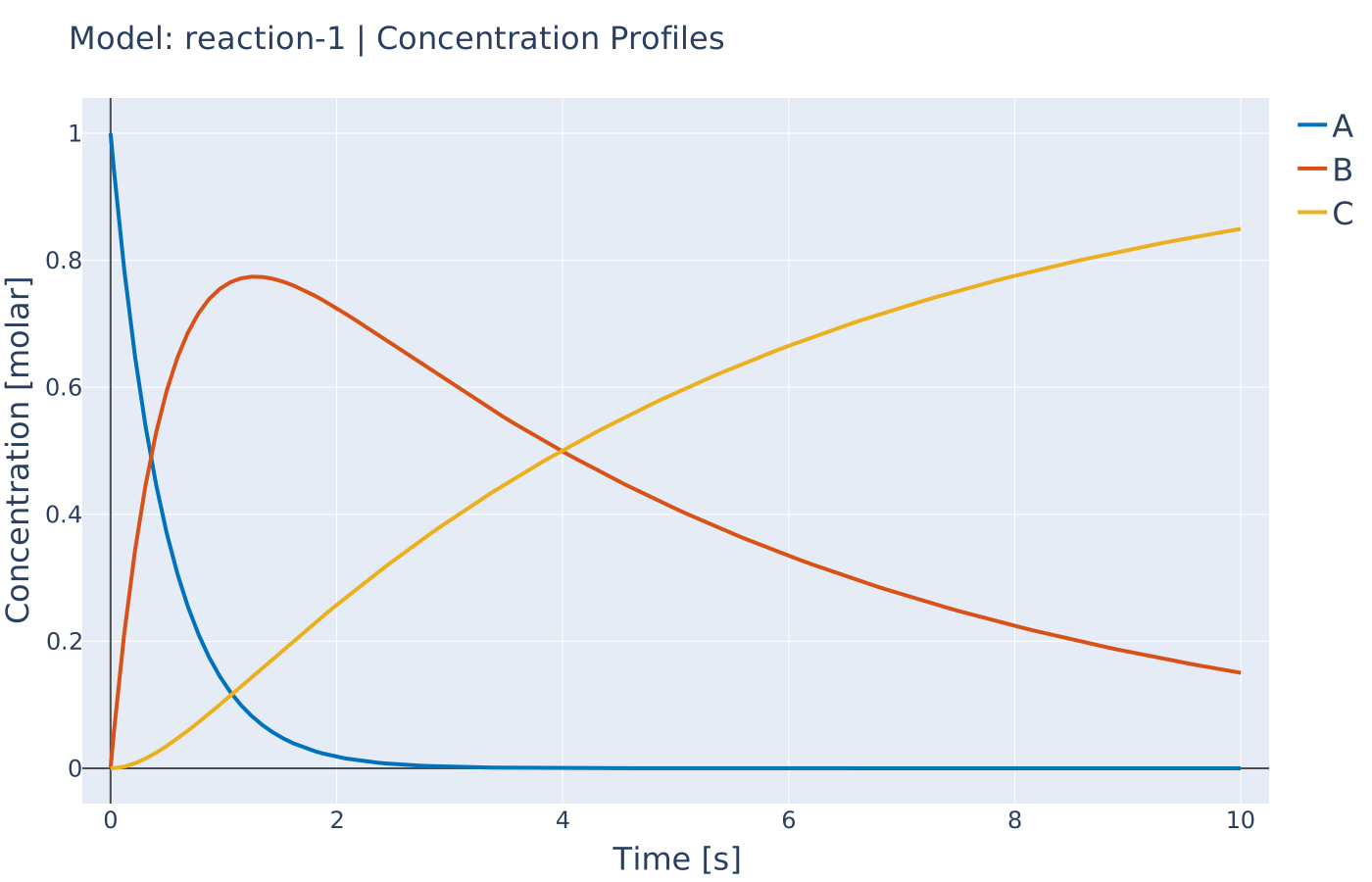
Fig. 9 Plot obtained from tutorial example 1